Why is my crypto deposit showing "Pending Declaration"?
Jul 11, 2026
If you have successfully deposited crypto using a new wallet address and the deposit appears as [Pending Declaration] on the OSL platform, this means that additional declaration information is required before it can be credited to your account.
Please follow the steps below to submit the required declaration.
App
- Log in to the App and tap [Assets] at the bottom right. (If you see [Portfolio] instead of [Assets], please tap the [OSL] label at the top right to turn off OSL Pro mode)
- Next to the Transaction History icon, tap the [$] icon to enter the [Pending Declaration] page.
- Locate the relevant pending declaration record and tap [Declaration].
- Fill in the required information (e.g. Sender Name, Address Source, etc.).
- Tap [Submit] to complete the declaration.

Web
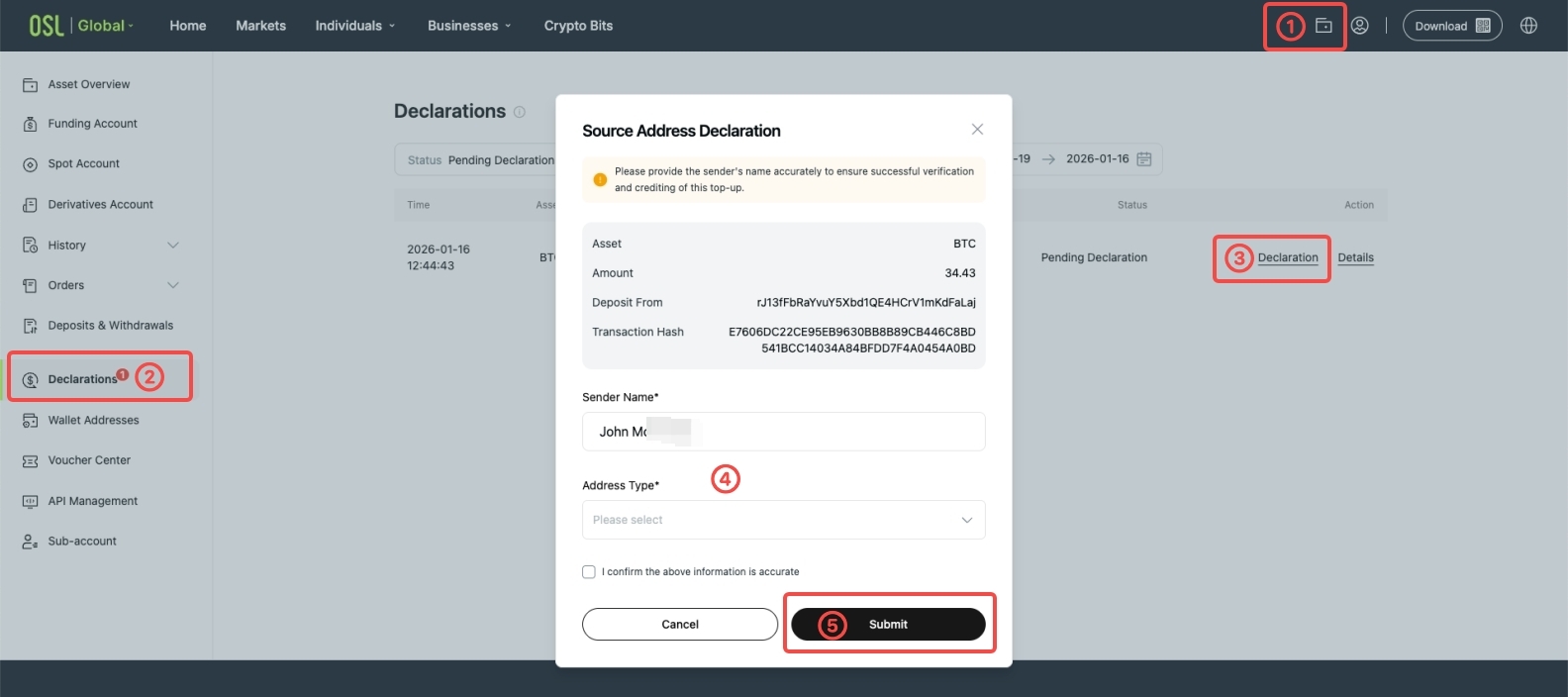
- Log in to the web platform and click the [Wallet] icon at the top right.
- Go to the [Declarations] page.
- Under Pending Declarations, locate the relevant transaction.
- Review and complete the required information (e.g. Sender Name, Address Type, etc.).
- Click [Submit] to complete the declaration.
Once the declaration is submitted, the deposit will be processed after review. Processing time may vary depending on the case.
Only deposits that require additional information will appear under Pending Declarations. If the deposit does not appear, please allow some time for the system to update or contact our customer support for assistance.