How to Add and Verify Wallet Addresses
⚠️ Important Reminder (Please read carefully):
Supported wallet types: This platform only supports the use of "Personal Wallets" (wallets where you control your private keys). To meet compliance requirements, address verification must be completed before use.
Exchange restrictions: If you need to transfer funds from an exchange, currently only PantherTrade is supported. Other exchanges (such as Huobi, Binance, OKX, Polymarket, etc.) are not supported.
Retail User Restrictions: Upon registration, you are a retail user by default and can only trade BTC, ETH, LINK, and SOL. If you need to trade other cryptocurrencies, please upgrade to a Professional Investor (PI). (Note: Even if retail users successfully verify non-supported currencies, the actual transactions will still be blocked.)
To further strengthen account and asset security and mitigate potential risks, OSL HK will introduce a 24-hour Protection Period for new withdrawal addresses added and verified by individual retail users. For more information, please refer to the following article: Announcement on the Protection Period for New Withdrawal Addresses
📱 App Operation Steps:
Navigate to the deposit page: Click on "Assets" > "Deposit".
Select your desired currency and network.
For supported currencies, the system may ask you to choose between "Personal Wallet" or "Exchange"(only PantherTrade is supported).
Select "Personal Wallet" and choose your preferred verification method.

🟢 Method 1: Add via Wallet App (Automatic Verification)
Directly connect to your wallet through WalletConnect (only supports specific currencies like ETH and SOL).
The system will automatically recommend supported wallet applications.
The system will automatically read the address, eliminating the need for manual copying.
Steps:
[1. Initiate Connection] - Click "+ Add Wallet Address" > Select "Add via wallet app" > Click "Connect Wallet".

[2. Authorization and Confirmation] - Select the wallet App you wish to connect from the list, and allow the system to redirect you to the wallet App to confirm the connection request. Return to OSL, verify the network and address read by the system, and click "Continue".

[3. Name and Signature Verification] - Enter a custom name and complete the 2FA (Two-Factor Authentication). Click "Sign", which will redirect you to the wallet App to click "Confirm" and complete the verification.
🟢 Method 2: Add by Entering Address (Manual Verification)
Enter your personal wallet address, select the associated currency, and click "Continue".
Enter a custom name, complete the 2FA verification, and then click "Verify now".
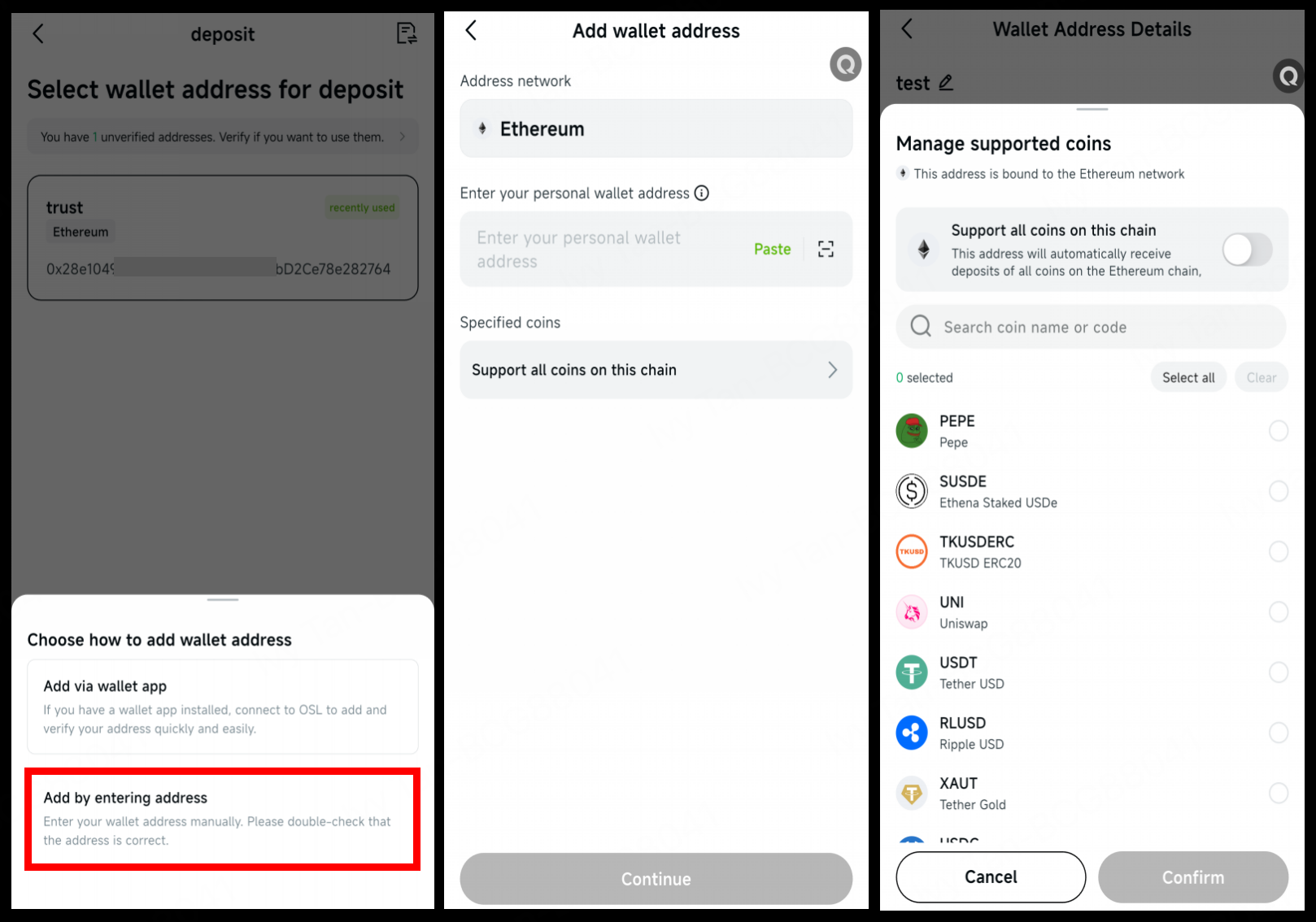
Manual verification offers two options:
a) Micro Deposit Verification:
Transfer the exact amount specified by the system. Once completed, click "I have deposited the specified amount".

This method is suitable for most users.
A new amount will be generated every time a new address is added. Please ensure that the final deposit amount, after deducting any network/transaction fees, exactly matches the amount required on the page.
b) Signature Verification:
Select "Signature Verification", copy the message to your external wallet, and sign it to complete the verification.
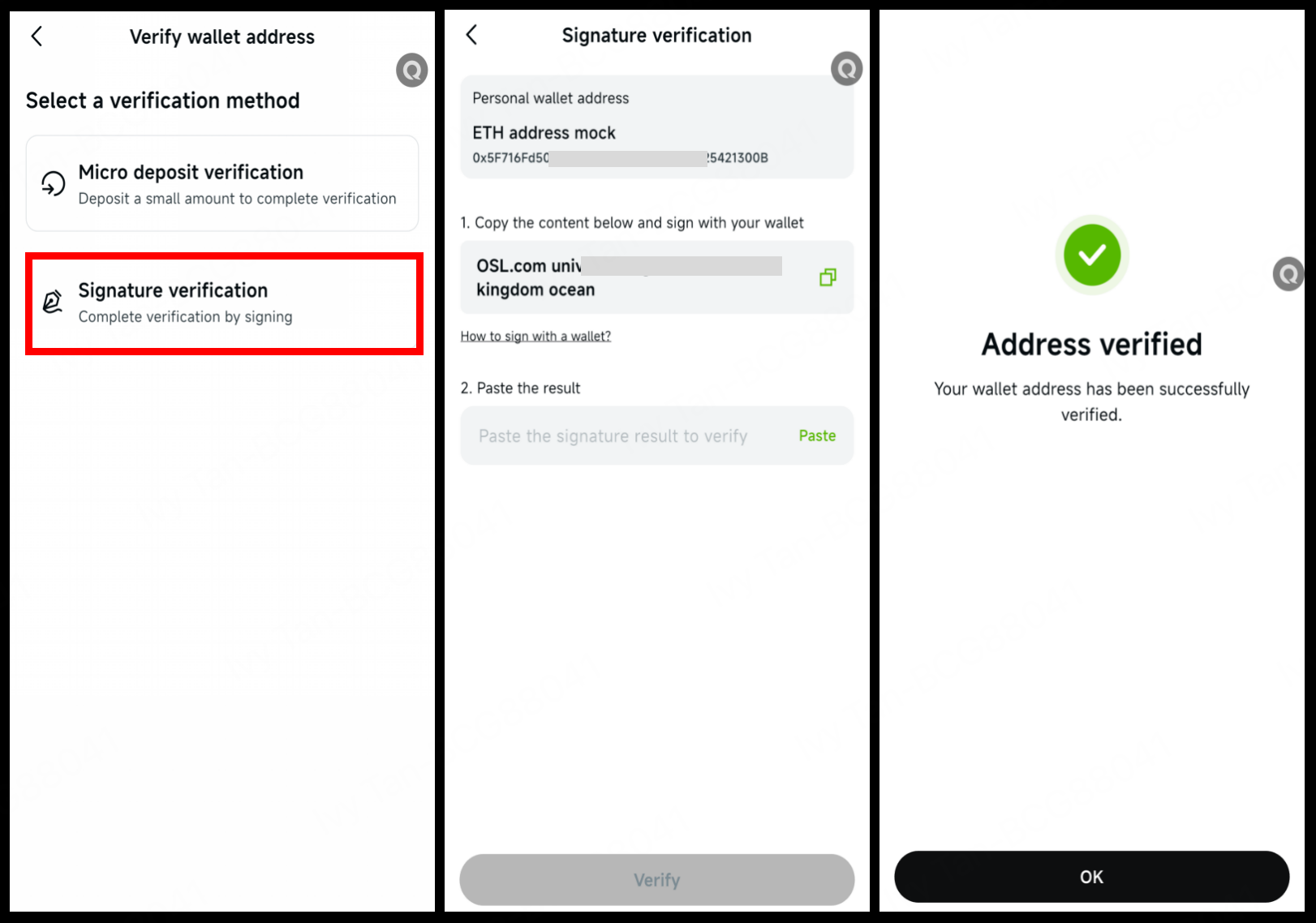
Note: Not supported by all wallet applications.
Exchange Verification - PantherTrade Only (Supports specified cryptocurrencies only)
Select "Exchange", and the page will display a deposit QR code.
Please log in using your PantherTrade account (the account name must match your registered name on OSL).
Follow the on-screen prompts to complete the deposit. Transfers from non-matching accounts will result in deposit failure or loss of assets.
💻 Web Operations Steps:
Click the "Wallet Icon" in the upper right corner > "Wallet Address Management" > "Add Wallet Address".
Select the currency and paste your private wallet address (you may add a custom name), then click "Confirm".
After completing the 2FA verification, click "Go to Verification".
Select a verification method and follow the prompts:
a) Micro Deposit Verification: Transfer the exact amount specified by the system (ensure the amount matches after transaction fees are deducted).
b) Signature Verification: Copy the message to an external wallet to complete the signature.
⚠️ Important Notes:
Accurate Amount: When using "Small Deposit Verification", the final amount received, after deducting network fees, must be exactly the same as the system requires.
Network Alignment: Please ensure you transfer using the specified network prompted on the page. Using an incorrect network will result in a permanent loss of funds.
Retail User Restrictions: Retail users will still be unable to trade even if they successfully verify addresses for non-supported currencies (e.g., PI-only currencies).
Review Time: New wallet verifications require manual review. We appreciate your patience.
Verification Validity: The wallet verification is valid for one year only. It must be re-verified after expiration.
If your deposit has not been credited after 1 hour, please contact our customer service team for further assistance: [email protected]
You may also want to read: