How to Use Pro Trade
Pro Trade
Pro Trade is designed for experienced users looking for advanced control and specialized trading tools. In Pro mode, you can customize your execution strategy using two primary order types:
Market Order: Buys or sells immediately at the best available market price.
Limit Order: Executes only when the market price reaches your specified target price.
How to Use Pro Trade
Transfer your funds: Before trading, transfer your funds to your Pro Trade account. (Reference Guide: How to Transfer Funds to Start Trading)
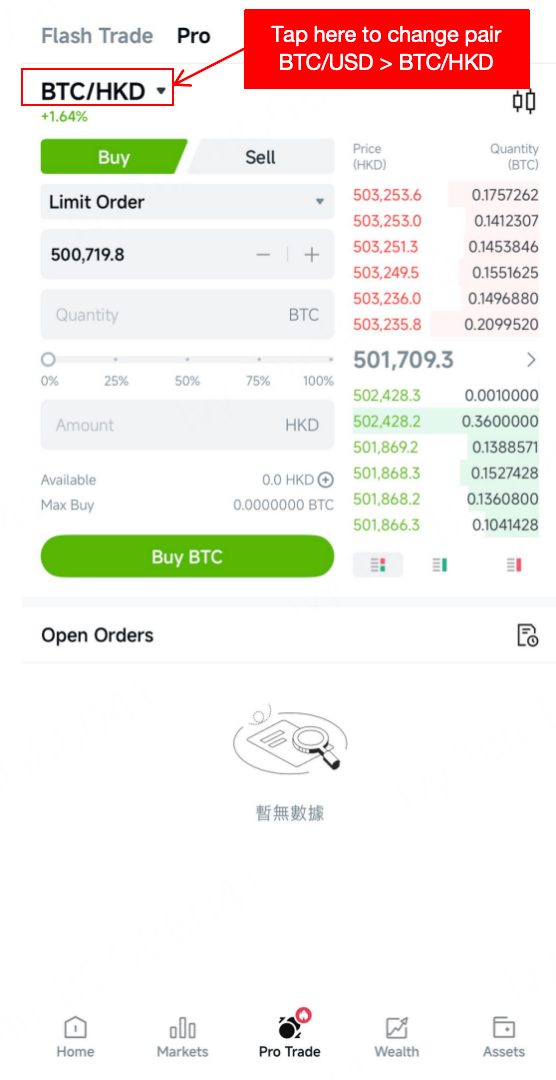
Access the Trading Platform: Go to Pro Trade > Trade to begin.
Select Your Trading Pair: Choose the specific asset pair you want to trade from the market list. (Note: If your funds are in HKD, please ensure you select a trading pair that includes HKD (e.g., BTC/HKD).
Choose Action: Click on Buy or Sell.
Select Order Type:
Limit Order: Enter your desired Quantity, and Price or Amount.
Market Order: Enter the Quantity you wish to trade.
Confirm Order: The system will display a prompt for you to review and confirm your details before the order is placed.
For any questions or further assistance, please contact our 24/7 live chat service or email us at [email protected]