OSL Global | One-click to Buy Crypto with Card

OSL Global Seamless Payment Looking for a fast way to fund your digital assets? OSL Global provides a superior fiat-to-crypto solution. We support payments in over 100 global fiat currencies, ensuring a smooth transaction experience wherever you are.
Global Reach: Pay with your local currency from a selection of over 100+ fiat options.
Flexible Payment: We support Visa and Mastercard (Credit or Debit cards), as well as Apple Pay and Google Pay.
Zero Friction: No tedious forms to fill out; your account is automatically created upon your first order.
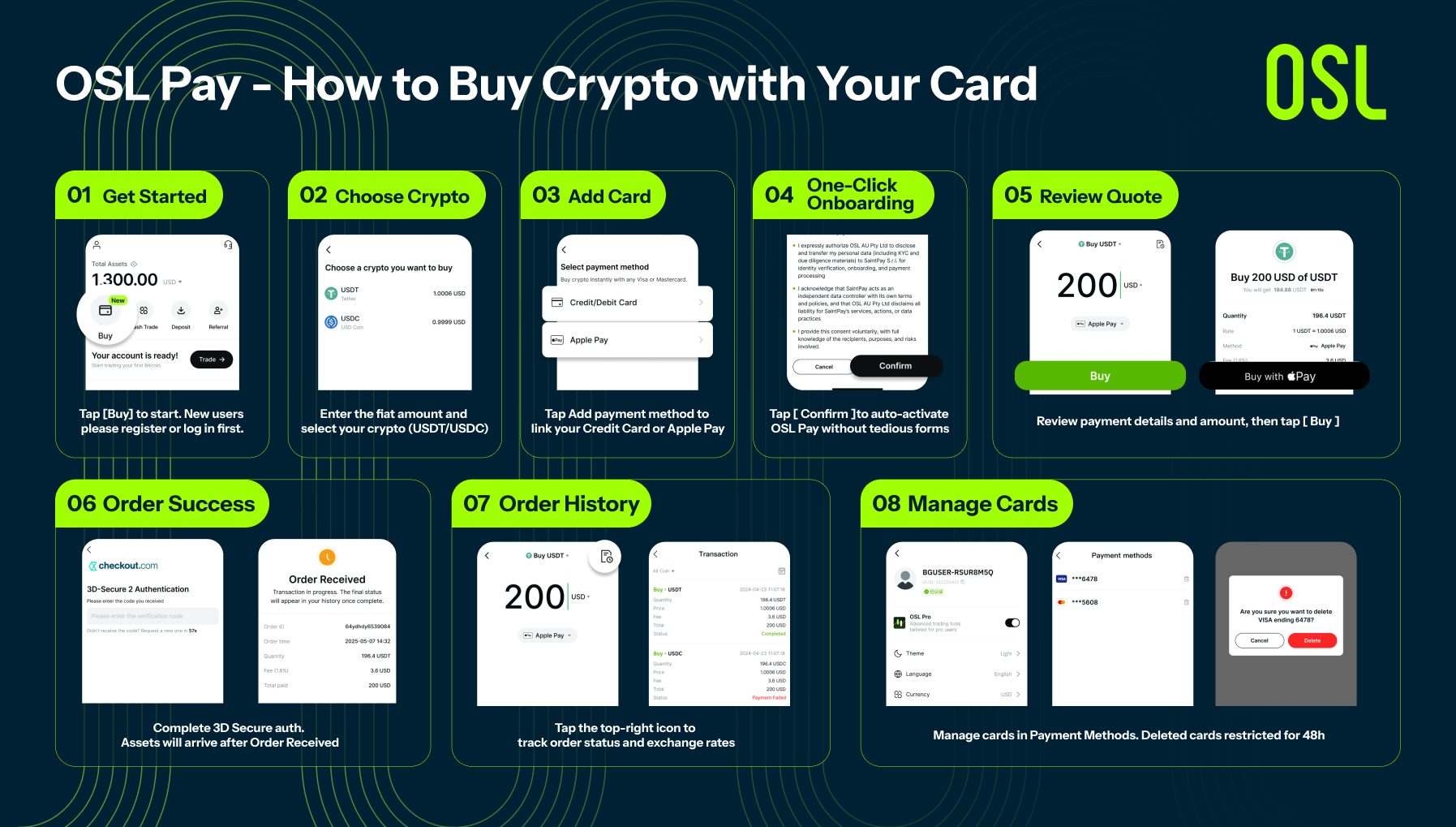
01 | Quick Access
Open the OSL App Home Page and click the [Buy] button to start. Users must be logged in to proceed.
02 | Select Currency & Amount
Enter the amount of fiat currency you wish to pay. With support for 100+ fiat currencies, you can pay in your preferred local currency. Then, select the crypto you want to buy (USDT or USDC).
03 | Choose Payment Method
For first-time use, select your payment method. You can link a Credit/Debit Card (Visa/Mastercard) or choose the faster Apple Pay or Google Pay options.
04 | Automatic Account Creation
Click [Confirm] on the authorization page. The system will automatically apply for an OSL Pay account for you—no need to fill out complex forms, enabling a true "one-click" experience.
05 | Confirm Quote
Review the transparent order preview, including the fiat amount, payment method, and estimated crypto to be received. The final amount received will match the displayed quote with no hidden fees. Click [Buy] to confirm.
06 | Security & Completion
Complete the 3D Secure verification (service provided by Checkout). When the screen shows Order Received, your order is successful and assets will be credited shortly.
07 | View History
Tap the icon in the top right corner of the Buy page to view order status and exchange rate details at any time.
08 | Manage Cards
Manage your linked cards in Payment Methods. Please note: once a card is deleted, it cannot be re-added for 48 hours. Proceed with caution.
(Note: This feature is currently supported only on OSL Global and is not available on OSL HK.)
More About Topics
More About Topics


Latest
OSL Global | One-click to Buy Crypto with Card
Learn how to use OSL's "One-click to Buy Crypto with Card" feature to instantly purchase USDT/USDC using Visa, Mastercard, or Apple Pay with automatic account creation and zero hidden fees.
OSL Global | One-click to Buy Crypto with Card
January Re-Engagement Begins — BTC Holds Above 90k as Flows Improve, Leverage Returns Selectively
Market focus: ETF inflows vs. stablecoin liquidity. This balance dictates trend sustainability or continued rotation and volatility.

January Re-Engagement Begins — BTC Holds Above 90k as Flows Improve, Leverage Returns Selectively
Year-Turn Calm, Positioning Resets Ahead of January Liquidity
Markets transition into year-turn with liquidity rebuilding. Price moves are driven by positioning resets rather than conviction, requiring ETF/stables flow confirmation for durability.

Year-Turn Calm, Positioning Resets Ahead of January Liquidity
BTC in the 2025 Macro Cycle: Safe-Haven Misalignment and Shadow Liquidity Tools — OSL Research No. 1
This report analyzes the decoupling of Bitcoin from gold in 2025, exploring its evolution from "Digital Gold" into a "Shadow Liquidity Tool" highly sensitive to global macro trends

BTC in the 2025 Macro Cycle: Safe-Haven Misalignment and Shadow Liquidity Tools — OSL Research No. 1
Institutional Risk Analysis of the Corporate Treasury Model: A Case Study of MicroStrategy — OSL Research No. 2
Using MicroStrategy as a case study, this report analyzes institutional risks and structural challenges of the "Corporate Treasury Model" through on-chain metrics and capital market behavior

Institutional Risk Analysis of the Corporate Treasury Model: A Case Study of MicroStrategy — OSL Research No. 2

Recommended For You
More About Topics
More About Topics